CA 21 - Basic Select SQL Queries
1. Query all columns for a city in CITY with the ID 1661.
The CITY table is described as follows:

Here we make use of the where conditon cllause to retrieve the details of the Id with 1661, we select all the columns to be displayed and "*" is avoided for best practice.
SOLUTION:
100000. The CountryCode for America is USA.The CITY table is described as follows:
Here we make use of the where condtional clause, to obatin the population to be over thhe given number we make use of the' >' symbol to achieve this. Also the AND operator is used to state two where conditons where we want only the details of cities in USA so we use the countrycode check with 'USA' single quotes are used to check with the value, usage of double quotes will make the db server to assume it to be column
SOLUTION:
JPN.The CITY table is described as follows:
In this problem too we will make use of the where conditional clause. As we need only the details of the cities in japan we check with the country code of all the records to pick only the cities from japan
SOLUTION:
The STATION table is described as follows:
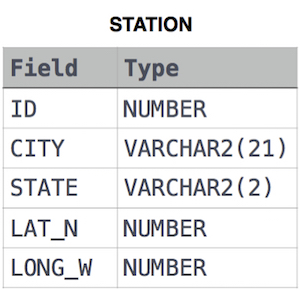
where LAT_N is the northern latitude and LONG_W is the western longitude.
For example, if there are three records in the table with CITY values 'New York', 'New York', 'Bengalaru', there are 2 different city names: 'New York' and 'Bengalaru'. The query returns , because .
Here we make use of the COUNT() function to count the total number of cities and then use the COUNT() to count and DISTINCT() to get the unique cities, so we nest the DIsitinct inside count. The rest of the distinct cities is given to the Count function to count and the difference "-" is used to get the difference.
SOLUTION:
120000. The CountryCode for America is USA.The CITY table is described as follows:
Here similar to already solved problem we make use of where conditonal clause with AND operator to check two conditions if the cities are in USA and the population is greater than 120000, also only NAME column is used to select from the table
SOLUTION:
JPN.SOLUTION:
SELECT NAME FROM CITY WHERE COUNTRYCODE = 'JPN';
Input Format
The STATION table is described as follows:
where LAT_N is the northern latitude and LONG_W is the western longitude.
Here to obtain the given result, we first make use of distict to get unique cities and to get the cities which start with only consonants, we make use of NOT LIKE and string matching '%' with starting vowel to obtain the consonants only.
SOLUTION:
The CITY table is described as follows:
This is a simple select query, selecting all the columns and getting the records from the CITY table
SOLUTION:
The STATION table is described as follows:
where LAT_N is the northern latitude and LONG_W is the western longitude.
This is too a simple select query with specific collumns to be retrieved , such as city and state from the station table.

Comments
Post a Comment